CSS field notes · October 2026
A copied button looks almost right? Check all four corners.
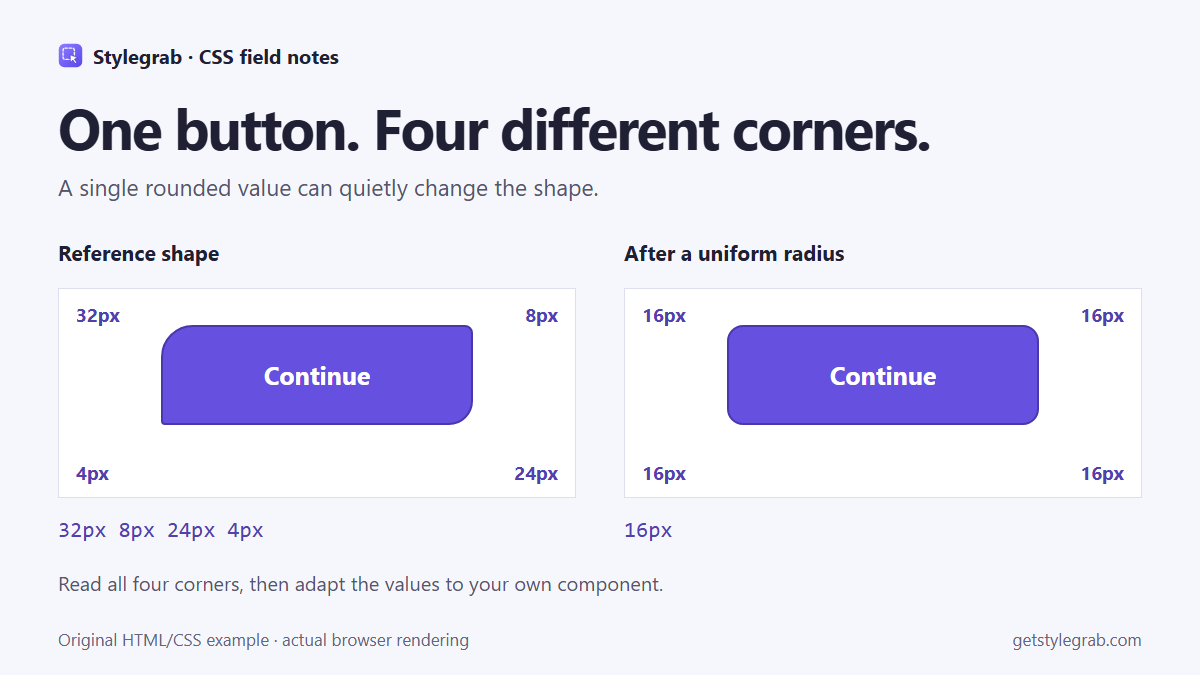
The text, background and spacing match, but a copied button still feels wrong. Before changing its shadow, check whether you accidentally turned four different corner radii into one.
This is a small shape error that is easy to miss when translating a reference into a reusable component. It is also easy to reproduce without installing a tool.
Reproduce the difference
Paste this into an HTML file. Both buttons have the same dimensions, border, font and colors. Only the radius changes:
<div class="examples">
  <button class="action reference">Continue</button>
  <button class="action uniform">Continue</button>
</div>
<style>
  .examples { display: flex; flex-wrap: wrap; gap: 24px; }
  .action {
    box-sizing: border-box;
    width: 312px;
    height: 100px;
    border: 2px solid #4937ad;
    background: #6550df;
    color: white;
    font: 600 25px system-ui, sans-serif;
  }
  .reference { border-radius: 32px 8px 24px 4px; }
  .uniform { border-radius: 16px; }
</style>
The first shape is deliberately asymmetric. The second is a reasonable-looking rounded button, but it is a different shape. This comparison is an original browser-rendered example, not a claim that a particular framework or copying tool produced the mistake.
Read the four values in order
With four values, border-radius follows this order: top-left, top-right, bottom-right, bottom-left. A single value applies to all four corners.
If the shorthand is hard to read, inspect the individual computed properties:
const button = document.querySelector('.reference');
const s = getComputedStyle(button);
console.table({
  topLeft: s.borderTopLeftRadius,
  topRight: s.borderTopRightRadius,
  bottomRight: s.borderBottomRightRadius,
  bottomLeft: s.borderBottomLeftRadius
});
For this example, the result is 32px, 8px, 24px, 4px. In DevTools, use the Computed panel to read the result and the Styles panel to find the winning declarations. A later shorthand can reset individual corners you set earlier.
Adapt the shape deliberately
If you want this exact reference shape, keep all four values. If your design system calls for a uniform radius, choose that intentionally. The goal is to understand the difference before making the change.
With Tailwind, do the same comparison using the corner-specific utilities supported by your installed version. Do not replace an asymmetric shape with a generic rounded utility simply because the class name looks close. Theme tokens can also change the actual values behind a familiar utility name.
Check at the intended dimensions and viewport. Percentage radii, elliptical radii and large values can behave differently as the box changes size. Matching the four values in this fixed-size example does not establish that every responsive size, focus state or hover state is finished.
A short check before shipping
Compare the four corner values first, then the border width and color. Test the result in your destination layout, where fonts, dimensions and inherited styles can differ. Keep the component's accessible name and visible keyboard focus when moving from a visual example to production.
You can follow this workflow with browser DevTools. I am also involved in building Stylegrab, whose free Chrome tools provide style inspection and CSS copying. Our owned-component sample lets you explore example output without installation; it only runs on our sample components and does not inspect other websites. Copied CSS still needs adaptation in your project.
Which detail most often makes a copied component look wrong: corners, borders, fonts or spacing? Please describe your own example without sharing client or private pages.
Disclosure: product development and this article used AI assistance. The four-corner example and comparison image were checked in a browser.
Technical reference: MDN border-radius.