Find the right element
Open Stylegrab on a normal webpage. Hover a button or card, click to pin it, then inspect its fonts, colors and spacing.
 Stylegrab
Inspect a component’s styles, copy what you need, then adapt it to your own page. Built for front-end developers who learn by building.
Chrome 1.0.5 is available. No account or card needed.
Edge is in review. Firefox desktop 1.0.5 is available on Mozilla Add-ons. The Firefox edition does not include CodePen export.
Start small. Keep the reference and your implementation at the same viewport, then check what the pasted output actually looks like.
Open Stylegrab on a normal webpage. Hover a button or card, click to pin it, then inspect its fonts, colors and spacing.
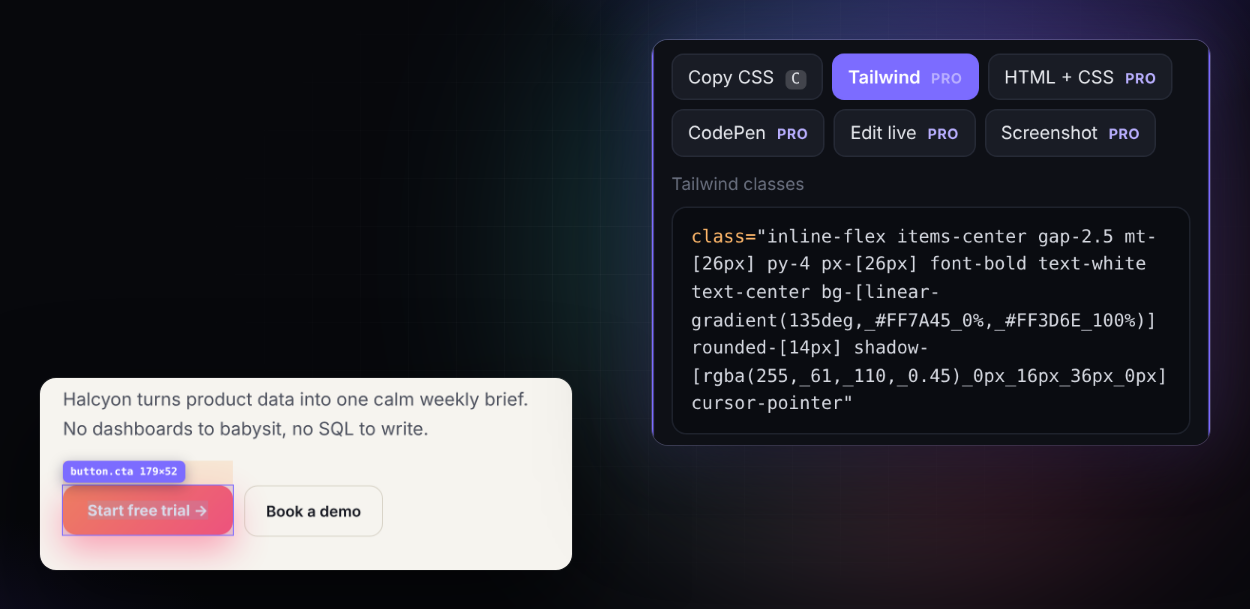
Press C for CSS. Try Tailwind or a static HTML + CSS snapshot when you need a different starting point.
Verify fonts, spacing and layout. Component exports need adaptation; they do not recreate the original app’s behavior.
Follow the practical workflow or watch the current release demonstrations.
CSS field notes: Check four different corners · Find the cause of a measured space.
Bring a button’s colors, spacing and individual corners into Tailwind. Use the generated classes as a starting point and check the result in your project’s layout and theme.
Included in the daily Pro trials. Try CSS and Tailwind on the sample.
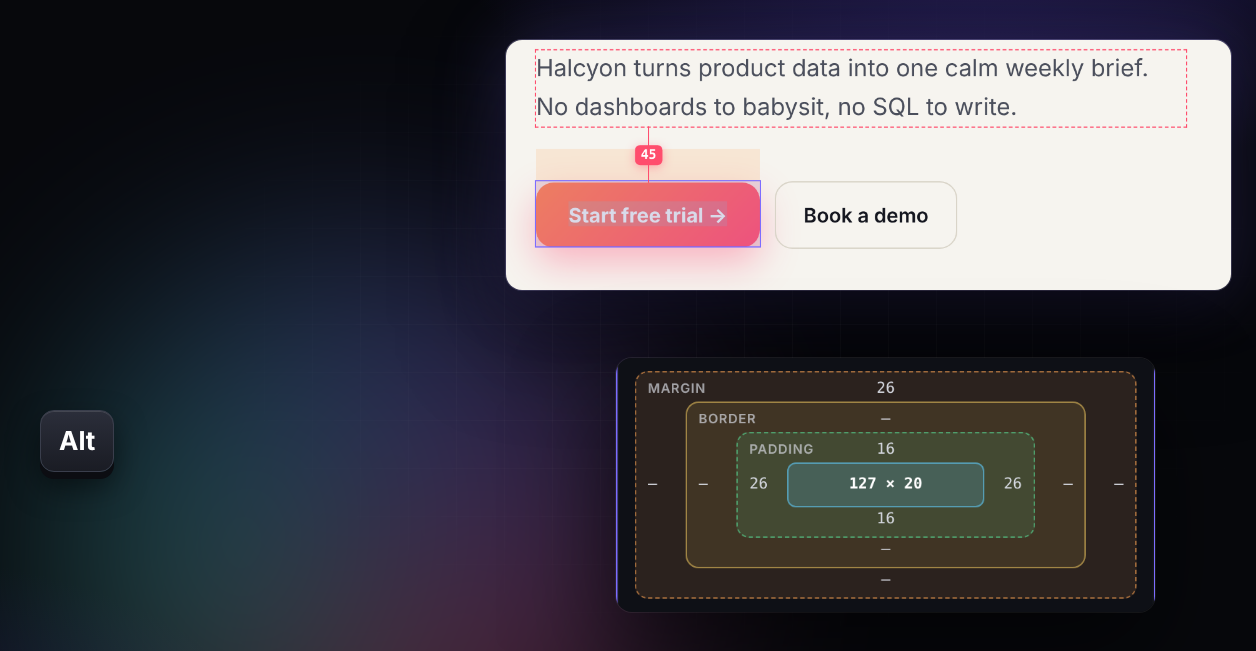
Pin a component, hold Alt and hover another element. Read the gap alongside its margin, border and padding, then check the same values in your implementation.
Use the tool for focused styling tasks. Keep DevTools alongside it when you need to trace the cascade or debug application behavior.
Read the box model, navigate nested elements, measure gaps and pick colors without opening a separate inspector panel.
Copy CSS, try Tailwind classes or export a static component. Check external fonts and resources before using the result.
Review colors and typography, collect a design brief, and inspect contrast where the background can be determined reliably.
Pin a selection, press C to copy, navigate to a parent or child, and press Esc to exit. Keep your color format, units and panel position between sessions.
Start with free inspection tools and three free uses of each Pro action per day. Upgrade for unlimited Pro actions.
$19 once for one person, up to 3 browsers, including version 1.x updates. Applicable tax is shown at checkout. License key delivered by email. Full refund within 14 days; see our terms.
Pro opens soonThe interface follows your browser: English, 简体中文, 繁體中文, 日本語, 한국어, Español, Português, Deutsch and Français.
Use Stylegrab for quick inspection, measurements and reusable styling references. DevTools remains useful for tracing the full cascade, debugging JavaScript, checking network requests and saving changes through a connected workspace.
Exports are a starting point. HTML + CSS captures a static snapshot at the current viewport, up to 400 elements. It does not rebuild JavaScript interactions, all responsive rules or Shadow DOM contents. External fonts and assets can still be required.
When stylesheet rules cannot be read, Stylegrab falls back to computed values. Those describe the current rendered state, rather than the author’s complete source or responsive system.
Inspection and clipboard exports run locally. License operations contact the license service; confirmed CodePen exports send the selected code; asset downloads contact their sources. See the privacy policy.
Chrome is available. Edge is in review. Firefox desktop 1.0.5 is available on Mozilla Add-ons. The Firefox edition does not include CodePen export. Browser internal pages and extension store pages cannot be inspected. Open Shadow DOM and same-origin frames are supported; cross-origin frames have browser-enforced limits.